Steam Profile Lookup
/idUsage: /id <steamid>
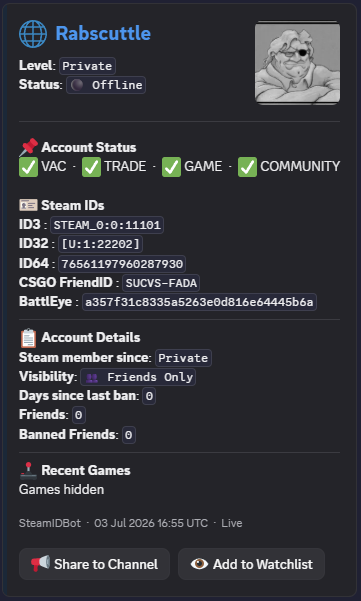
Full Steam profile at a glance — display name, avatar, account creation date, country, all Steam ID formats, name history/aliases, recent games with playtime, and banned friends summary.
- ▸ Works with SteamID64, Steam2, Steam3, vanity names, and full profile URLs
- ▸ Shows account age, country, and avatar
- ▸ Lists recent games with playtime
- ▸ Shows banned friends count
- ▸ Also available via right-click → Apps → Lookup Steam ID
VAC & Ban Checker
/vacUsage: /vac <steamid>
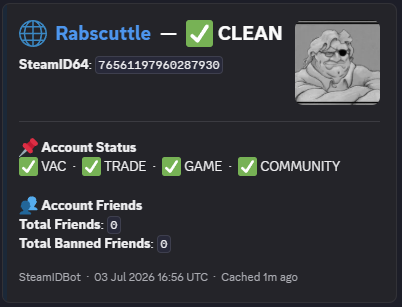
Complete ban status check — VAC bans, game bans, community ban, trade ban, days since last ban, and full banned friends list with details.
- ▸ Shows VAC ban count and days since last ban
- ▸ Shows game ban count
- ▸ Community ban and trade ban status
- ▸ Full banned friends list with ban details
- ▸ Essential for community moderation and player vetting
Game Statistics
/statsUsage: /stats <steamid>
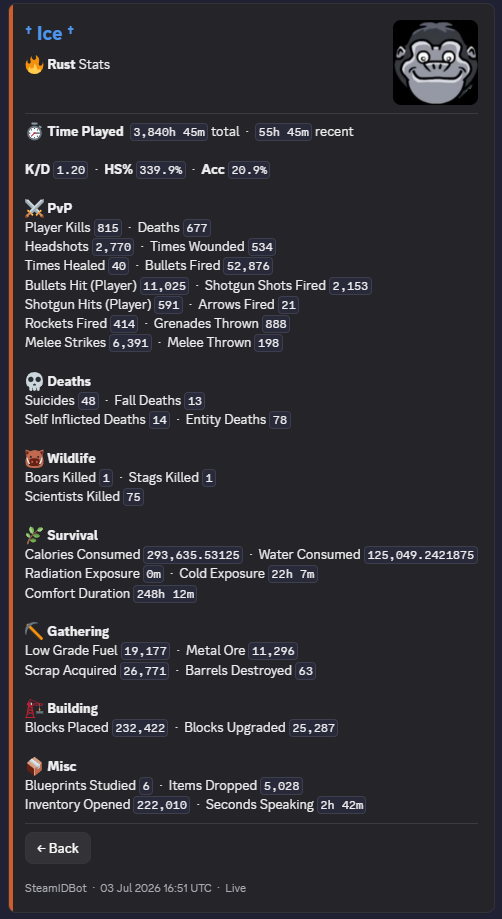
Detailed in-game statistics with an interactive game picker. Currently supports Counter-Strike 2 and Rust. More games coming soon.
- ▸ CS2: Kills, deaths, K/D, HS%, accuracy, wins, MVPs, weapon kills, bombs planted/defused
- ▸ Rust: Player kills, deaths, K/D, headshots, bullets fired/hit, rockets, melee, wildlife, survival, gathering, building
- ▸ Interactive game picker — click a game, stats load in place
- ▸ More games planned
FACEIT Profile Lookup
/faceitUsage: /faceit <steamid>
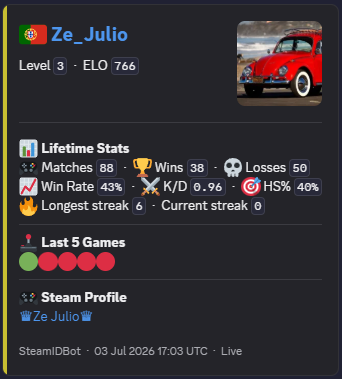
FACEIT CS2 profile stats — skill level, ELO, matches played, win rate, K/D, HS%, and recent match results at a glance.
- ▸ Shows FACEIT skill level and ELO
- ▸ Matches played, win rate, K/D ratio, HS%
- ▸ Recent match results with scores
- ▸ Works with any Steam ID format
Watchlist — Ban & Name Alerts
/watchUsage: /watch
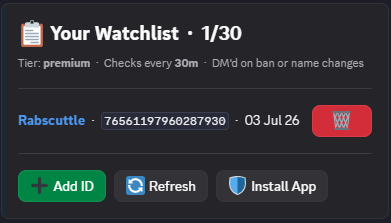
The standout feature. Add Steam profiles to your personal watchlist and get automatically DM'd when they get banned or change their display name.
- ▸ Tracks VAC bans, game bans, community bans, trade bans
- ▸ Tracks Steam display name changes
- ▸ DM alert includes exactly what changed
- ▸ Dismiss button to keep your DMs clean
- ▸ Manage everything in one interactive panel
- ▸ Free: 5 profiles, checked every 3 hours
- ▸ Premium: 30 profiles, checked every 5 minutes
Help & Guide
/helpUsage: /help
Full command guide, accepted ID formats, and tips for finding a Steam ID. Everything you need to get started.
- ▸ Lists all available commands
- ▸ Shows accepted Steam ID formats
- ▸ Tips for finding Steam IDs
- ▸ Links to support server
Accepts Every Steam ID Format
No need to hunt for a specific format. Every command accepts all of the following:
76561197960287930STEAM_0:0:11101[U:1:22202]gabelogannewellhttps://steamcommunity.com/profiles/76561197960287930https://steamcommunity.com/id/gabelogannewellhttps://steamcommunity.com/profiles/76561197960287930/friends/add🖱️ Right-Click Lookup
Right-click any Discord message → Apps → Lookup Steam ID — the bot scans the message for any Steam ID format and instantly runs /id. No typing required.
Ready to Try These Commands?
Invite SteamIDBot to your server and start looking up profiles in seconds.
Add to Discord — Free