VAC & Ban Checker for Discord
Instantly check any Steam profile for VAC bans, game bans, community bans, and trade bans. See days since last ban and full banned friends list — all with one slash command.
Add SteamIDBot — Free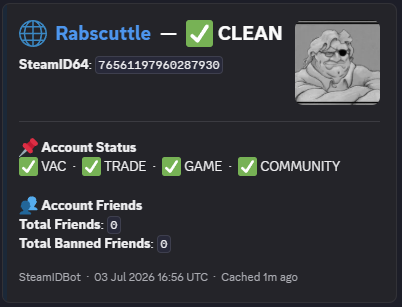
What /vac Checks
VAC Bans
Valve Anti-Cheat bans with count and days since last ban
Game Bans
Developer-issued game bans from individual titles
Community Ban
Steam community ban status for the profile
Trade Ban
Trade ban status — essential for traders and market users
Banned Friends List
Full list of friends with bans, including ban type — useful for spotting patterns
Use Cases
Vet new members before they join your server. One /vac command tells you everything you need to know.
Check opponents and teammates before scrims or tournaments. Avoid playing with cheaters.
Verify trade partners for community and trade bans before any transaction.
Screen clan/guild applicants. A clean Steam profile is often the first requirement.
Also check out: Watchlist Alerts · Commands · Premium